Tech Tip: Photo Viewing via HDMI

If you want to share your images and movies by displaying them directly on an HD television, you can connect the two using the camera’s HDMI port. To make this process easier, in the camera menu select ‘Control over HDMI’ and enable it. With this done, you will be able to control the camera using the television remote control rather than having to reach for the camera every time you want to change a picture.

Since you don’t have to download the images to your laptop you save a little time too. I like to sit back and relax with a nice glass of wine as I review the assignment pics over our 65″ flat screen. This system makes my editing choices easier due to giant size of the images on the screen that show the details magnified.

I know most of the professional versions of Canon Cameras have the HDMI ports under the rubber covers along the side of the camera, like the picture above.

Source: Canon Professional Services.

Posted in Photography Tips | Tagged , , , , , , , , , , | Leave a comment

Travel to Cuba or Bahamas from Florida by Ferry

20150309_170105
Contributed by:  Martin Allred  www.floridaography.com

The (South Florida) Sun Sentinel reported last year that four companies have received licenses from the U.S. government to run ferries between Florida and Cuba. Overnight trips from Miami, Fort Lauderdale, and perhaps Tampa on vessels holding 300 to 500 passengers. Ferry prices are expected to start at around $300 round trip.

Just be patient, ferry services  probably won’t start until late this year or early 2017, and could take longer, according to companies involved in the ventures.

Spain’s ferry veteran Balearia said that it has proposed to invest more than $35 million to build a ferry terminal and related facilities in Havana to help speed the start of Florida-Cuba service. Havana has to approve that project because Cuba needs to develop terminal facilities for proposed ferries from Florida, complete with customs and immigration processing and room to handle passengers and freight. That requires millions of dollars in investment.

I personally think the Balearia Ferry will be one of the first ships to sail to Cuba because it’s operated by Spain and doesn’t have all the U.S. Government restrictions in place to overcome.

I know that the Balearia Ferry operating out of Ft. Lauderdale to the Bahamas is a very nice ship and about the size of a smaller cruise ship.  Last spring the ship had 1st class accommodations with really good food in the dining room too.  We paid about $165 each for a 1st class ticket to Ft. Lauderdale from Freeport, Bahamas. The journey was approximately 4 hours.

FLL.png

A regular ticket on main deck is somewhere around $75 now to the Bahamas.  I don’t know if they still have 1st class, but an “Economy Premium” ticket is $110. Also, full service bars with other cheaper fare was available if we had opted to budget or skip the fine dining.  A round trip ticket with departure taxes and all is approximately $232 if you select economy premium status now.

20150309_192334

damen-hfp.jpg
Havana Ferry Partners’ boat, with capacity for 160 passengers. It would cover the Key West-Havana route in less than 3 hours, at a possible cost of only $300 (roundtrip). Image taken from HFP’s Facebook page.
11156272_902180219843979_7617822266435061599_n-755x490.jpg
Havana Ferry Partners LLC has said that they will be confirmed at a later date, but will include regular passenger ferry service between Port Everglades, FL and Havana.
The other company that has been granted a license is Baja Ferries USA, a Limited Liability Company (LLC) from Texas, which is already active in Mexico, the Dominican Republic and Puerto Rico.
I figure tickets will range between $250 to $350 depending on the perks available. As more companies compete for the ferry shuttle service to Cuba, the prices may drop slightly.
Posted in Dining | Tagged , , , , , , , , , , , | Leave a comment

Macro Photography without a Macro Lens

imgres-1.jpgimgres.jpg

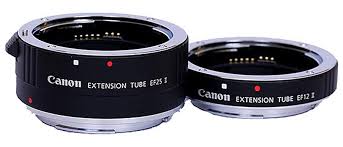
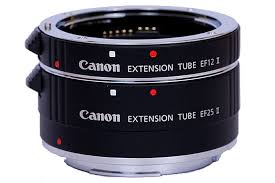
If you want to get closer to your subjects for increased magnification, the standard route is to employ a macro lens when shooting. However, if you only have occasional use for a macro lens it may seem like an undue expense. If this is the case, then it’s worth having a look at Canon’s EF12 II and EF25 II Extension tubes. These can be used with Canon’s EF-S lenses as well as most EF lenses. They fit between the lens and camera body (just like an Extender) but instead of having optics, they are simply hollow tubes. They effectively move the lens farther away from the camera body’s sensor (or film plane), thus allowing you to focus on subjects much closer than the normal minimum focusing distance of the lens – they thereby achieve increased magnification. It’s not true macro, but for large insects like butterflies and dragonflies, or for shooting flowers, it’s a very good solution.

Source: Canon Professional Services

Contributed by: Martin J. Allred

Posted in Photography Tips | Tagged , , , , , , , , , | Leave a comment

Tech Tip: Canon EOS 6D Smartphone Remote

imgres.jpg images-1.jpg

EOS 6D: smartphone connection via WiFi

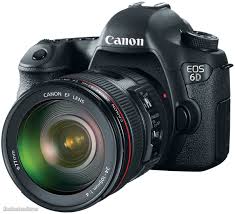
The EOS 6D’s built-in WiFi facility allows you to connect the camera to a smartphone and then use the EOS Remote app to control the camera and transfer images. This WiFi connection can be set either in ‘Camera Access Point’ mode or ‘Infrastructure’ mode. Infrastructure is for connecting through an access point, such as a WiFi router. However, if you are working away from home, you will need to use the Camera Access Point mode. This connects directly to the camera and requires no additional access points or routers.

Source: Canon Professional Services

Contributed by: Martin Allred

http://www.floridaography.com


Posted in Photography Tips | Tagged , , , , , | Leave a comment

Tech Tip: Gelling your Flash

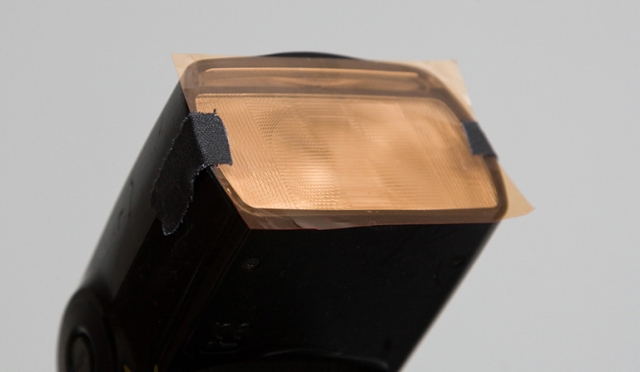
gelled-flashIf you’re shooting a lot under tungsten or strip lights flash is useful to fill-in, or even to provide additional light, but the discrepancy in color temperatures can be a problem. Do you shoot with white balance set for tungsten/fluorescent or flash Ponder the question no longer. Set the white balance for the ambient light and gel your flashes to match – the process is cheap and straightforward. All good camera stores will sell sheets of lighting gels designed for studio flash. Major brands are Lee and Rosco. Simply buy the appropriate gel and cut sections off to fit to the front of the Speedlite.  Secure with tape, elastic bands or if you are feeling smart, fix velcro on camera and gels.

You can buy on the link below.

Contributed by: Martin Allred

http://www.floridaography.com

Posted in Dining | Tagged , , , , | Leave a comment

Florida Beaches Best in the U.S.

Travelers' Choice Florida 

According to Tripadvisor’s recent survey, Florida captures 1st place for the best beaches in the United States, including Hawaii.  The good news for Florida was that six of Florida’s beaches were named in the top 10 list. The bad news is with all the latest hype comes more tourists compounding the local traffic problems.

First Place went to Clearwater Beach, while last year’s 1st place winner Siesta Beach came in 3rd, and St. Pete in 4th place. St. Pete Beach was 2nd overall last year.

The top Florida beaches are well known for their sugar like white sand and beautiful clear aqua colored waters.

20141228_131022

Photo:   Martin Allred    Siesta Beach in Sarasota, FL

You can visit the link here to see all the winners: http://www..com/TravelersChoice-Beaches-cTop-g191

Contributed by: Martin Allred

http://www.floridaography.com


Posted in Dining | Tagged , , , , , , , , , | Leave a comment

Glass Disc Can Store 360 TB of Your Photos for over a Billion Years

Scientists have created nanostructured glass discs that can storage digital data for billions of years.

Researchers at the University of Southampton announced this week that they’ve figured out how to store huge amounts of data on small glass discs using laser writing. They call it five dimensional (5D) digital data because in addition to the position of the data, the size and orientation plays a role too.

The glass storage discs can hold a whopping 360 terabytes each, are stable at temperatures up to 1,000°C (1,832°F), and are expected to keep the data intact for 13.8 billion years at room temperature (anything up to 190°C, or 374°F).

It’s a discovery that “opens a new era of eternal data archiving” because the discs have “virtually unlimited lifetime,” the university says, and museums, national archives, and libraries could benefit from having this eternal storage.

So far, scientists have preserved important documents such as the Universal Declaration of Human Rights (UDHR), Magna Carta, and Kings James Bible on individual discs that will likely survive the human race.

The Universal Declaration of Human Rights recorded on a 5D glass disc. The researchers are now looking for companies to help bring this data storage technology to market. No word on when it might appear or whether it will be available and affordable to ordinary photographers, but perhaps one day we’ll be able to store our entire lifetime body of photos on a single disc that is guaranteed to survive us (and all our descendants).

A reblog by: Floridaography.com

Posted in Photography Tips | Tagged , , , , | Leave a comment

Tip & Tricks: AI Servo AF response

images.jpg

The Al Servo setting on the EOS Canon Professional Cameras are normally  fast enough to keep up with a moving subject. However, in very cold conditions you may find the AF response slows down a little and you have trouble tracking the subject. If this happens, try to keep the camera warm – if you are visiting a particularly cold country or are shooting within the arctic circle, ensuring the camera is covered and as warm as possible will allow the best AF tracking possible. As an aside, it will also help extend battery life.

News Source: Canon Professional Services

By: Martin Allred

http://www.floridaography.com


Posted in Photography Tips | Tagged , , , , , , , , | Leave a comment

Gluten Free Strawberry-Walnut Shortbread Cookies

This cookie is a favorite and absolutely one of the best shortbread cookies you will ever taste. This recipe is from Sigrid von Zielfeldt from Sweden. I have altered the original recipe to make gluten-free.

Makes approximately 50  two-inch sandwich cookies

1 cup of real butter (two sticks)

2 -1/2 cups of organic granulated raw sugar ( reserve 1- 1/2 cups for dusting finished hot cookies)

1/4 cup of dark brown sugar

2 cups of ground Walnuts (three cups of chopped makes two cups of ground)

1 cup of Gluten Free  Flour

1 cup of Almond Flour

1/2 teaspoon of salt

1  teaspoon of pure vanilla extract

12 oz of a really good Raspberry or Strawberry Jam.

20181219_101835

Mix butter until creamy. Add sugars reserving 1.5 cups for dusting, until mixture creams again. Add vanilla and continue mixing, then add ground walnuts, salt, flour and mix well. Refrigerate for approximately two hours. Keep dough in a refrigerator until ready to roll.

Cut dough in half and press out by hand on a flour-dusted flat surface until dough is approximately 3/16 inch thick.

20181218_151028


Cut cookies with a two-inch cookie cutter or shot glass like a true Swede or Irish person would do.

20181218_180620

Place cookies on an ungreased cookie sheet and bake at 375F for 11-13 minutes. Do not wait till they turn brown or rise. They will only brown on the edges and rise slightly.

Remove from oven and rest for no more than 3-5 minutes. While cookies are still warm spread jam on cookie’s bottom and sandwich with another cookie.  Roll cookie’s seam and both sides in sugar and place on dish to finish cooling.

Notes: Don’t over food process chop the walnuts Not looking for a paste, should look more like a meal. Also, to intensify the walnut flavor roast them in the oven and let them cool. I usually roast most nuts prior to eating. The nut flavor will be so much more intense.


Posted in Dining, Just for Fun | Tagged , , , , , , , , , , | Leave a comment

The World’s Largest Photo, Taken with the World’s Largest Camera

The year was 2006

worlds largest photo taken with worlds largest camera, the great picture (1)

Photograph by Robert Johnson


The Great Picture” measures 107 ft wide by 31 ft high (32.6 m x 9.5 m) and holds the Guinness World Record for the largest seamless print photograph ever. The camera with which it was made also holds the record for being the world’s largest.


worlds largest photo taken with worlds largest camera, the great picture (2)


The single photograph was created in 2006 by a group of six artists—Jerry Burchfield, Mark Chamberlain, Jacques Garnier, Rob Johnson, Douglas McCulloh, and Clayton Spada—along with hundreds of volunteers.

They transformed an abandoned F/A-18 fighter jet hangar into a gigantic pinhole camera by darkening and sealing the interior from outside light. A pinhole, just under a quarter-inch in diameter (0.635 cm) was centered between the metal hangar doors to serve as the camera’s aperture.


worlds largest photo taken with worlds largest camera, the great picture (6)

Photograph by Douglas McCulloh


Artists and volunteers lift the uncoated Great Picture muslin into place in the hangar-as-camera.


worlds largest photo taken with worlds largest camera, the great picture (3)


A seamless piece of muslin cloth was made light-sensitive by coating it with 21 US gallons (80 l) of gelatin silver halide and then hung from the ceiling at a distance of about 80 feet (24 m) from a pinhole, just under 6 millimetres (0.24 in) in diameter and situated 15 feet (4.6 m) above ground level on the hangar’s metal door. The distance between the pinhole and the cloth was determined to be 55 feet (17 m) for best coverage, and the exposure time was calculated at 35 minutes.


worlds largest photo taken with worlds largest camera, the great picture (7)

Photograph by Douglas McCulloh


The hangar-turned-camera recorded a panoramic image of what was on the other side of the door using the centuries-old principle of “camera obscura” or pinhole camera. An image of the former El Toro Marine Corps Air Station with the San Joaquin Hills in the background, appeared upside down and flipped left to right on film after being projected through the tiny hole in the hangar’s metal door.

The opaque negative image print was developed by 80 volunteers during five hours in a vinyl pool liner custom tray, the size of an Olympic swimming pool, with 600 US gallons (2,300 l) of traditional developer and 1,200 US gallons (4,500 l) of fixer pumped into the tray using high volume pumps. The photograph was then washed using fire hoses attached to two fire hydrants (seen above).


worlds largest photo taken with worlds largest camera, the great picture (4)


A repos by: Martin J. Allred http://www.floridaography.com


Posted in Photography Tips | Leave a comment